


Writing an application is getting faster. Getting it into users’ hands should be just as straightforward. Yet developers and architects still spend too much time choosing infrastructure, connecting deployment tools, and managing the handoffs between code and cloud. Whether an application is written by a developer or built alongside an AI coding agent, the next step should focus on the application, not on assembling the platform around it.
Today, we are announcing the public preview of Azure App Service Builder. Builder is a code-first, agent-ready application hosting experience in Azure App Service that helps developers and AI coding agents move from code to a running app at ultrafast speed. It brings application builds, hosting, and deployment management into one experience, giving developers and small teams a simpler path to Azure, whether connecting a GitHub repository or deploying through their own build and release workflows.
For developers, Builder reduces setup and manual handoffs so they can deploy, validate, and iterate faster. For architects and technical decision makers, it provides an application-focused entry point to Azure while retaining the subscription, resource-management, and governance foundation their organizations already use.
The public preview begins with compute for static sites, web applications, and HTTP APIs. Over time, our direction is to add more of the building blocks applications need, allowing teams to grow from an initial deployment toward fuller application architectures without having to start over on another platform.
Evolving Azure App Service for the agentic era
App Service Builder introduces a new application experience in App Service, built on Azure Container Apps Sandboxes - the compute foundation behind a new generation of agent-ready offerings across Microsoft. Each sandbox runs within its own hardware-isolated microVM boundary, providing the isolation needed to build and run application code without requiring developers to provision or manage the underlying machines.
This foundation is designed for a world in which both developers and AI coding agents create, deploy, and continuously refine applications. Azure Container Apps Sandboxes provides the backend infrastructure layer with isolated compute that can support fast, dynamic development workflows. Builder adds the application layer on top, bringing together the workflows for building, deploying, hosting, and managing an app.
The same underlying sandbox infrastructure also supports GitHub Copilot experiences, Foundry Hosted Agents, Microsoft Copilot, Security Copilot and Azure Container Apps Express. With Builder, App Service applies that foundation to application delivery, giving developers and AI coding agents a streamlined path from code to a running app while Azure manages the compute infrastructure beneath it.
A familiar workflow, built for Azure
If you have used a platform that connects to your repository and turns source code into a running application, the starting point will feel familiar. App Service Builder brings that approach to Azure, pairing an opinionated developer experience with Azure subscriptions and resource management.
The aim is straightforward: make the first deployment easier without treating your application as a throwaway prototype. Start with your code, describe how it should build and run, and let Builder handle the build and hosting workflow. Choose the experience that fits your workflow: the Builder portal, the dedicated Builder CLI, or the Builder app canvas in GitHub Copilot, Claude Code, or Visual Studio Code. Azure Resource Manager provides the underlying resource-management foundation.
For teams that want a simpler starting point on Azure, this means less day-one platform assembly and a clearer place to manage the application as it evolves. Our direction is an experience that is approachable for individual developers while growing toward the operational control and governance that enterprise teams expect.
From your code to an app you can share
Choose the deployment path that fits your workflow: connect an authorized GitHub repository for source-based builds, or use ZIP deploy to deploy your application as a ZIP package. Track deployment progress and verify the result at the service-provided app URL.
The initial experience focuses on static sites, HTTP web applications, and APIs, including supported frontend-plus-backend combinations. Rather than asking you to choose and wire up a collection of hosting resources first, Builder organizes the workflow around the app you are delivering.
Simpler deployment should not mean losing visibility or control. Build and deployment records help you understand what happened, while version history lets you return to an eligible retained version as you iterate. You can make a change, deploy it, check the result, and keep iterating.
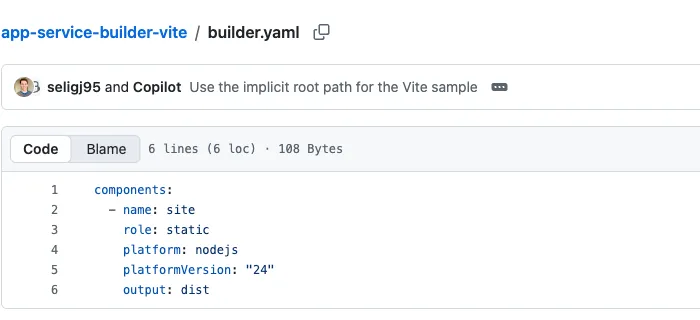
Here’s a simple Vite app deployed with App Service Builder - from source code to a running application.
Start with the source. The repository contains the application and its builder.yaml. In this example, the manifest describes a static component, a Node.js build environment, and the dist output directory.
Inspect the build and deployment. The Builder portal shows the stages from starting the deployment and building the application through checking startup and health and making the app live.

Explore the sample app. The sample displays a configurable greeting, documentation links, and a Check app health button that checks its static health file, not Azure services.

From AI-assisted development to a running app
AI coding tools are changing how applications get started and how quickly they evolve. A developer can explore an idea with GitHub Copilot, generate a first implementation, and refine it through conversation. But generating code does not remove the need to build it, host it, and check how it behaves outside the development environment.
App Service Builder is designed around both sides of that workflow: code-first for the developer, agent-first in how we think about application delivery. Whether your application began with hand-written code or an AI-assisted session, Builder provides a place to take that code into a running Azure application.
For example, you might use Copilot to build a web interface and an HTTP API, push the code to GitHub, and deploy the supported application through Builder. The Builder app canvas gives you another way to work with your app alongside your coding conversation, rather than switching to a separate management experience. As you refine the app, you repeat the same source-to-deployment workflow instead of rebuilding its hosting setup each time.
Our longer-term goal is a tighter development loop in which developers and coding agents can move from editing to deployment, feedback, and refinement while keeping people informed and in control. We will continue expanding that experience as the platform evolves.
How Builder fits alongside existing Azure App Service experiences
App Service Builder is a new option in Azure App Service, not a retirement of what you already use today. Existing App Service experiences remain available and supported, and continue to be a strong choice for a wide range of workloads. That includes established production web apps and APIs, applications that need Windows or Java support, and workloads that depend on App Service’s mature networking and deployment capabilities. There is no requirement to move an existing application to Builder.
Builder is designed for new applications where a streamlined code-to-app workflow and integration with AI coding agents are priorities. It’s a great fit for a new web experience, a frontend with an HTTP API, or an AI-assisted application that a small team wants to deploy and iterate on without first assembling its hosting platform. Public Preview is an opportunity to explore how Builder fits your applications and help shape the experience. We welcome all feedback from what works well to what’s missing or getting in your way. As we work toward production readiness, we recommend trying Builder with development and test workloads. Our longer-term goal is to make Builder a home for your production applications.
What we are hearing from early users
Early-access users are testing Builder now, and their feedback is helping shape the experience. Their perspectives highlight both what makes the path from code to a running app simpler and where we can go further.
“I built a weather app with a backend and authentication using App Service Builder, and what really stood out was the simplicity: from GitHub to a running app in Azure with just a few clicks and no IDE required. That’s a powerful experience. Looking ahead, I’d love to see even deeper integration with Microsoft Entra, making it not only easy to deploy applications, but also easy to run them securely.”
Peter Paul Kirschner, Software Architect & Founder @ KYANIS
“Having been a huge fan of Static Web Apps over the last few years, App Service Builder provides even more options for deploying your applications! Being able to create, build, and deploy all from the command line with an AI agent makes it so much easier to prototype a new application - and the integration with GitHub means that it’s always up to date! I can’t wait to see where the team go with this!”
Stacy Cashmore, Omniplan Development B.V.
Public Preview: what to expect
This compute-focused public preview marks the first step toward our broader vision for an agent-first application experience. It is intended for development and test workloads, has no financially backed SLA, and is not recommended for production workloads. Supported regions, runtimes, workflows, and resource limits apply. Features and availability may change during Preview.
At launch, App Service Builder will be available in West US 2 and open to all Azure subscriptions. See the supported regions for the current region list, and the App Service Builder documentation to get started.
In this Preview, Builder focuses on hosting your application. You can connect it to databases and other services you manage separately. As Builder progresses toward general availability, we look forward to supporting your journey from development and testing to production-ready applications.
Public Preview is just the beginning. We’ll continue to expand Builder’s capabilities and bring coding, deployment, and application-management experiences closer together, so you can spend less time managing handoffs and more time building your app. Your feedback and feature requests will help guide that work - whether it’s something missing, a workflow that could be simpler, or a capability your applications need as they grow. Explore our public roadmap to see what we’re working on and where we’re headed. You can also submit feature requests and vote on existing ones to help us understand what matters most to you.
Try App Service Builder and help shape what comes next
App Service Builder will be available as a free public preview for the next few months, with resource limits and a limited set of features. Custom domains are not supported in this initial Preview; apps use service-provided URLs. Separately configured services, such as databases or AI services, may incur their own charges.
We are using this Preview to shape our longer-term pricing and billing approach, with the goal of offering a generous, competitive free tier and paid options that reflect how customers want to pay for a service like Builder. Your feedback on usage, value, and pricing preferences will help inform those decisions.
Start with a supported sample or bring a compatible application, choose a GitHub-connected workflow or ZIP deploy, and follow the quickstart to deploy your first Builder app. Whether you are working directly in code or alongside a coding agent, we want to make the path to a running Azure application feel like a natural next step.
- Get started: Open the Builder portal.
- Documentation: Explore the App Service Builder documentation and supported regions.
- Feedback: Use the feedback button in the Builder portal’s navigation bar.
Tell us what you built, where the workflow helped, and where it got in your way. Your feedback will help shape the next stage of App Service Builder.
Thanks for reading. Keep building.
Find another perspective
Join the discussion.
Anyone can read the comments. Sign in with GitHub to comment or react. Replies are public; please keep secrets and personal information out of them.